 @zoltandulac
 @zoltandulac
 Zoltan Hawryluk
Updates:
- Nov 6, 2012: I have written about a proposed extension to the CSS pseudo-classes used by HTML5 Forms in my later blog post CSS3 Pseudo-Classes and HTML5 Forms: Their Limitations and a Possible Solution. The webforms2 library supports these extensions, which may be of interest if you need advanced styling of HTML5 Forms that the specification doesn’t handle.
- May 13, 2012: The scripts mentioned in this article are now part of the html5Forms.js JavaScript library. It includes a newly refactored version of webforms2, which has an improved validation routine that has been refactored to mimic the behavior of the native implementations of latest versions of Firefox, Chrome and Opera. It also uses Modernizr and yepnope to only load the HTML5 Forms features that are not natively supported by the web browser using it. This article has been updated to reflect those changes — additional features have also been documented in my follow up blog post, Cross Browser Styling of HTML5 Forms — Even In Older Browsers
- May 12, 2011: html5Widgets has been updated to support the
oninputevent. - Aug. 6, 2010: An older version of this article was translated into Korean.
- Sept. 10, 2010: The webforms2 included with html5Widgets has been modified to fix validation issues with the newer versions of Safari and Chrome.
Working example HTML5 Form using Modernizr, webforms2 and my new script, html5Forms. Go ahead … try them out. You know you wanna!
Calendars, colour swatches, sliding widgets, client side validation: this is the nirvana that the HTML5 forms module promises. Some would say “So what? I’ve seen this on the web for years!”, and they’d be right. There have been some really brilliant people coding some really interesting widget and validation frameworks, so why should we change?
- Ease the markup learning curve: HTML5 form widgets and validation have been built to be as dead simple to markup as a select box with no JavaScript knowledge required
- It’s a W3C standard: so you know that it’ll work for years to come and if you have problems, you could always ask almost anyone in the web development community for help.
- Cellular phone support: HTML5 form fields will have optimized user interfaces appropriate for the type of device. Blackberry already has optimized versions of the date/time and color widgets and, according to Mark Pilgrim’s article A Form of Madness, the virtual keyboards that appear when using HTML5 form fields are optimized for the data being input.
- Web development tools will have to support it: It’s a safe bet that Aptana, Dreamweaver, and all the other IDEs out there will have HTML5 support.
- It’s HTML5: when you tell your non-techie co-workers that you use it, you will be the envy of all — after all, it must be five times better than regular HTML, right? Your boss will be so impressed that you are now a guru in this futuristic technology with a cool numbered acronym that he or she will give you a big fat raise!!!
(Okay, okay. Don’t try to laugh too hard … your co-workers will start to worry).
The Support Dilemma
Unfortunately, today’s support for the HTML5 Form Module is spotty with each browser supporting different parts of the specification. Take a look at Wikipedia’s HTML5 Forms comparison chart. You’ll see each browser supporting a different set of features, but not one supports them all.
But I Want To Use It Now!!!
Since I am impatient and want to use HTMl5 Forms right now, I put together the html5Forms.js library. html5Forms uses Modernizr to detect if there is native support for the parts of the HTML5 Forms specification a page wishes to use — if a browser doesn’t support the desired feature, html5Forms uses Modernizr’s yepnope lazy loader to grab some battle-tested third party JavaScript libraries to add support — html5Forms would not be possible without them. We shall discuss these scripts while we discuss the different parts of the HTMl5 Forms specification below.
Form Validation Using the required and pattern Attributes
The required attribute makes an input field mandatory and forces the user to enter in a value in order to submit the form data. The markup is simple
<input type="text" name="firstName" value="" required="required" />
(Note:, you can also just use required on its own if you aren’t trying to be XHTML compliant.)
The pattern attribute forces the user to enter in a value using a specified format. It uses regular expressions to define this format. For example, if you want to force the user to input a U.S. Zip Code inside a form field, you would use the following markup.
<input type="text" name="zipCode" value=""
   pattern="[0-9]{5}([-][0-9]{4})?" required="required"  />
Note that required and pattern are independent from each other. You can have a pattern set on a form field without it being required (i.e. the pattern would only be checked if the user enters in data into the field).
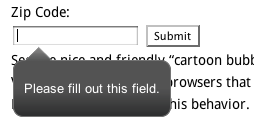
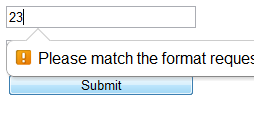
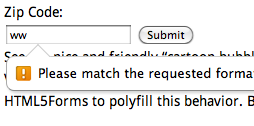
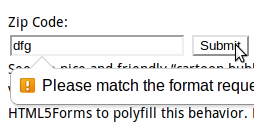
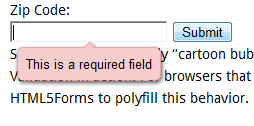
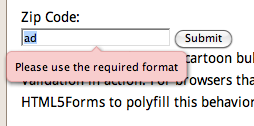
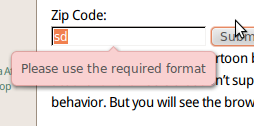
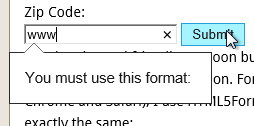
Opera 10+ (mobile and desktop editions) is the only browser that supports the validation routines natively. To use this in all other browsers, all you need is to include the following script tags in the head of your document.
 <script type="text/javascript"
      src="/path/to/shared/js/modernizr.com/Modernizr-2.5.3.forms.js">
 </script>

 <script type="text/javascript"
          data-webforms2-support="validation"
          src="/path/to/html5Forms/shared/js/html5Forms.js" >

 </script>
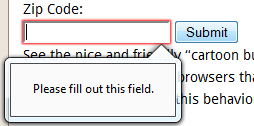
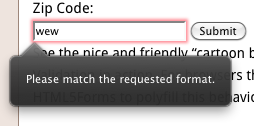
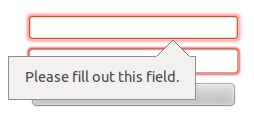
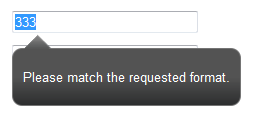
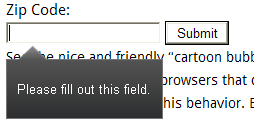
Note the data-webforms2-support="validation" in the script tag for html5Forms.js. This tells html5Forms to load Weston Ruter’s webforms2.js (which polyfill html5Forms validation. However, it only loads this script if the browser doesn’t support validation natively (The data-webforms2-support attribute can contain other HTML5 Form features in a comma delimited list, but more on that later).
Let’s take a look at how validation looks in the various browsers:
| Windows | Mac | Linux | |
|---|---|---|---|
| Firefox 4.0+ (native support) |
 |
 |
 |
| Safari 5.x- (polyfill) |
 |
 |
Not Applicable |
| Chrome 17+ (native support) |
 |
 |
 |
| Opera 11+ (native support) |
 |
 |
 |
| Opera 10.10 (native support) | ![[Screenshot of HTML5 Validation using Opera]](https://www.useragentman.com/blog/wp-content/uploads/2010/07/validityOpera.png "Screenshot of HTML5 Validation using Opera") |
Similar to Windows version | Similar to Windows version |
| IE8 (polyfill) |
 |
Not Applicable | |
| IE10 (native support) |
 |
||
(Note: Although the validation message bubbles look different in every browser, there is a way to apply a common style. Read my follow-up post, Cross Browser Styling of HTML5 Forms — Even In Older Browsers for more information.)
See an example of pattern and required in action.
Note that the same validation framework checks the values of inputs of type email, url and number to ensure that the values are in their respective valid formats. As an added bonus, if you are using the iPhone or iPad version of Safari, the virtual keyboard that appears will be optimized for these type of form fields (e.g. when editing a number field, the keyboard that appears contains only digits and the “+”, “-“, and “.” keys. This is native behaviour for iOS, and I hope other mobile browsers, such the Android’s, follow suit.
The autofocus Attribute
The autofocus attribute allows developers to choose which element has focus when the page is loaded. The Google front page has done this via JavaScript, and now, 12 years later, there is finally an HTML attribute to easily handle this.
<input type="text" name="fullName" value=""
  required="required" autofocus="autofocus" />
Safari, Chrome and Opera support it natively. Other browsers will support it if you ensure the autofocus is set in the data-webforms2-support attribute for the script tag that loads html5Forms.js
 <script type="text/javascript"
      src="/path/to/shared/js/modernizr.com/Modernizr-2.5.3.forms.js">
 </script>

 <script type="text/javascript"
          data-webforms2-support="validation,autofocus"
          src="/path/to/html5Forms/shared/js/html5Forms.js" >

 </script>
See an example of autofocus in action
The placeholder Attribute
A placeholder is a great visual cue to communicate any special information about a field (e.g. a description
of the data to be input, if the field is required, etc).
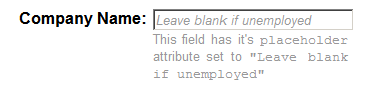
An example of placeholder text. The text disappears when the field has focus or if the user types information into the field.
Syntax is simple:
<input type="text" name="fullName" value="" required="required"
   placeholder="Required information" />
Safari, Chrome and Firefox support this attribute natively. Other browsers will support it if you add placeholder to html5Forms’ data-webforms2-support attribute:
 <script type="text/javascript"
      src="/path/to/shared/js/modernizr.com/Modernizr-2.5.3.forms.js">
 </script>

 <script type="text/javascript"
          data-webforms2-support="validation,placeholder"
          src="/path/to/html5Forms/shared/js/html5Forms.js" >

 </script>
See an example of the HTML5 placeholder
tag in action.
The range Input Type and output Tag
Easily my favourite of the HTML5 widgets, range gives developers a sliding control to put inside their forms.
The syntax is simple:
<input type="range" name="rangeEl" value="" min="0" max="150" step="1" />
The min and max attributes contain the minimum and maximum values, and step denotes by what increments the range slider increments by when moved. Note that you can use these attributes with the number input type as well, but instead of having the fancy interface, it will use the validation engine to ensure the value follows what these attributes dictate.
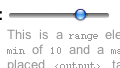
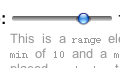
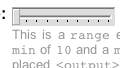
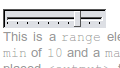
At the time of this writing, Opera and WebKit based browsers (like Safari and Chrome), support it natively, and html5Forms uses the Frequency Decoder Slider Widget to implement it in unsupported browsers. To ensure cross-browser HTML5 range element goodness, add range to html5Forms’ data-webforms2-support attribute:
 <script type="text/javascript"
      src="/path/to/shared/js/modernizr.com/Modernizr-2.5.3.forms.js">
 </script>

 <script type="text/javascript"
          data-webforms2-support="validation,range"
          src="/path/to/html5Forms/shared/js/html5Forms.js" >

 </script>
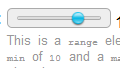
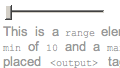
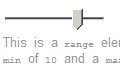
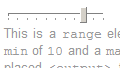
Take a look at the screenshots below. You will see that the way a range field varies among the browsers that natively support it, and even in some of the browsers that use html5Forms:
| Explorer 6.x+ (html5Forms support) |
Firefox 3.5+ (html5Forms support) |
Safari 4.0+ (native support) |
Chrome 3.0+ (native support) |
Opera 10.0+ (native support) |
|
|---|---|---|---|---|---|
| Windows | 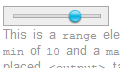 |
 |
 |
 |
 |
| Mac | Not Applicable | 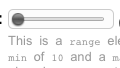 |
 |
 |
 |
| Linux | Not Applicable | 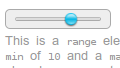 |
Not Applicable | 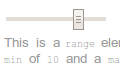 |
 |
The output tag can be used to show the value of a field, or the result of an operation performed on a number of fields, using JavaScript expressions. Although the output tag may calculate fomulas referencing any form fields, it is useful especially for the range input type so users can see what value the range element is pointing to:
<output onforminput="this.value = rangeEl.value">-</output>
<input type="range"  name="rangeEl" value="" min="0" max="150" step="1" />
The contents of the output tag is the default value. Note the this.value syntax – I am not sure why the W3C HTML5 working group decided it was needed (why not just have the formula?), but it is. If there are other types of expressions supported in the final specification, they are not supported by html5Forms at this time. Note that in order to apply CSS to the output tag in IE, it is necessary to use Remy Sharp’s HTML5 Enabling Script.
See an example of the range input being used with the output tag.
See an example of the output tag being used without a range field.
Update (May 12. 2011):
Since this article was written, the onforminput event has been deprecated in favor of the oninput. I have updated html5Forms to support oninput, and have written article about its oninput support. I encourage you to see the different between the above to examples and the oninput method of using the output tag with range and without range
The datetime, datetime-local, date and week Input Types
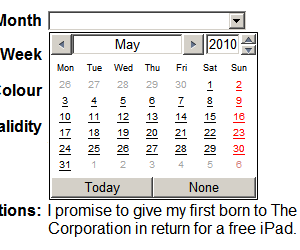
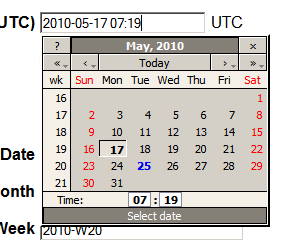
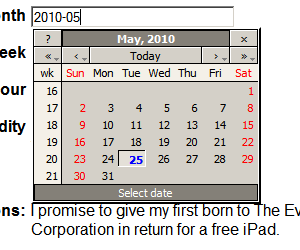
At the time of this writing, Opera is the only desktop browser that supports HTML5 date fields. To support the other browsers, html5Forms uses a slightly modified version of DynArch.com‘s Ex-“Coolest” DHTML Calendar (I decided not to use the coolest one because the Ex-Coolest has a more permissive license and it works really well). Now all browsers can support the datetime, datetime-local, date, month and week input fields, and submit these values in a consistent format.
For browsers that don’t support the date tag, all you need to do is add date to html5Forms’ data-webforms2-support attribute:
 <script type="text/javascript"
      src="/path/to/shared/js/modernizr.com/Modernizr-2.5.3.forms.js">
 </script>

 <script type="text/javascript"
          data-webforms2-support="date"
          data-lang="en"
          src="/path/to/html5Forms/shared/js/html5Forms.js" >

 </script>
Note the data-lang attribute. This is optional and dictates what language pack is used for the calendar. If data-lang is not included, it will use the browser’s default language as given by the navigator.language JavaScript property. For a list of all the languages supported, take a look at the js files inside the html5Forms/shared/js/jscalendar-1.0/lang directory.
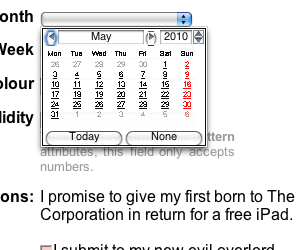
Below is a comparison between Opera’s native date widget vs. the one provided by the DynArch/HTML5Widget combo:
| DateTime Widget | Month Widget | |
|---|---|---|
| Opera Windows | 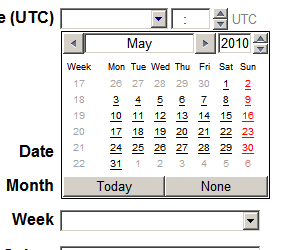 |
 |
| Opera Mac | 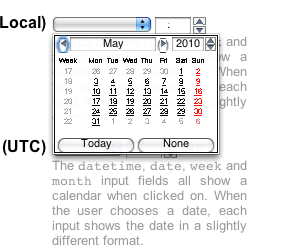 |
 |
| Firefox 3.5+ Windows (html5Forms support) |
 |
 |
It looks like the native calendar for Opera for Mac is a smaller than the Windows version – hopefully this is just on my copy of the browser.
The display formats, and they values that they submit to the server, are pretty much the same
| Input type | Format displayed on page | Format sent to server |
|---|---|---|
| datetime | yyyy-mm-dd HH:MM | yyyy-mm-ddTHH:MMZ |
| datetime-local | yyyy-mm-dd HH:MM | yyyy-mm-ddTHH:MM |
| date | yyyy-mm-dd | yyyy-mm-dd |
| month | yyyy-mm | yyyy-mm |
| week | yyyy-mmW | yyyy-mmW |
See the HTML5 date widgets in action.
Note: In this example, The Opera Mobile Windows Emulator incorrectly displays the datetime and datetime-local calendars in the upper left-hand corner of the screen, but not the other ones. Since this is Opera’s own calendar widget, and not html5Forms’, this bug will have to fixed by Opera.
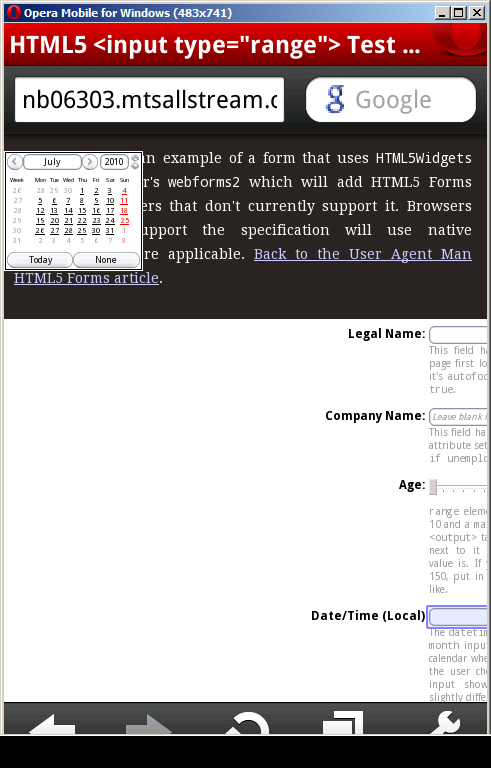
Screenshot of Opera Mobile bug
The color Input Type
Opera and the WebKit based Blackberry browser are the only ones that I know of that support the color input type. While we wait to see how the major browser manufacturers decide to implement color, you can use html5Forms’ implementation which uses Jan Odvarko‘s jscolor. The script has been configured to allow only allow lower case hexadecimal rgb values to be entered, and that a blank value not be allowed, as per the W3C spec.
Here are the script tags needed to implement this in all browsers:
 <script type="text/javascript"
      src="/path/to/shared/js/modernizr.com/Modernizr-2.5.3.forms.js">
 </script>

 <script type="text/javascript"
          data-webforms2-support="color"
          src="/path/to/html5Forms/shared/js/html5Forms.js" >

 </script>
Below is a comparison between the Blackberry’s implementation (grabbed from the Blackberry Development Blog), Opera’s and HTML5Widget/jscolor’s.
| Blackberry Web Browser | Firefox 3.5 with html5Forms.js |
|---|---|
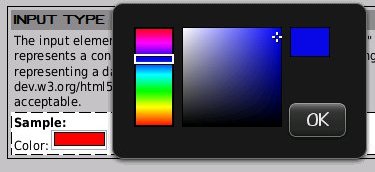
|
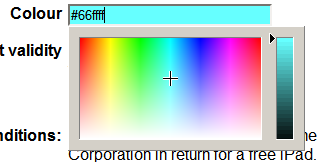
|
| Opera (initial click) | Opera (after clicking the “Other” button) |
|---|---|
|
|
|
See HTML5Widget’s implementation of the
color input type.
Note: Like other HTML syntax, color uses the unfortunate American spelling instead of the Queen’s Proper English (i.e. colour). Ensure you spell it incorrectly in order to make this work. ;-)
How Well Do These Libraries Handle the Official Specification?
I have done some testing on some existing examples that use HTML5 forms to ensure that it works the way developers expect. Here are a few examples that I have taken, with the necessary JavaScript added:
- A cool looking payment form by Inayaili de León (originally from her HTML5 forms tutorial)
- An HTML5 Form Demo by Richard Bradshaw (originally from his Fancy Forms: HTML5 + CSS3 – JS article)
However, the HTML5 Forms specification is large, and unfortunately, the libraries included in the html5Forms package don’t implement everything … yet!!!! Since I am really motivated with what HTML5 forms can do, I am committed to completing support to most, if not all, of the HTML5 Forms specification, and I have updated this package many times in the last two years.
Things that I will be working on in the near future are:
- Support for other HTML5 form elements, among other things,
datalist,number,keygen,time,meterandprogressprogresselement, read my blog post Cross Browser HTML5 Progress Bars In Depth. Support for CSS styling of HTML5 form widgets as well as the ability to style form fields according to their validation state (e.g.While html5Forms does not support the:validand:invalidpsudo-classes).:validand:invalidpsudo-classes directly, form elements that use the polyfill can be styled to mimic that behavior. Please read my blog post Cross Browser Styling of HTML5 Forms — Even In Older Browsers for more information.- Default styling for some of the new input types, like
tel,email,url. Opera for Mac and Opera Mobile are the only browsers I know of that support this foremailandurl.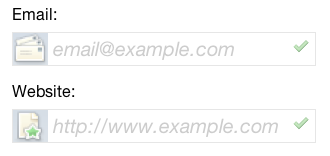
emailandurlform fields in Opera Mac Support for customizing the validation look and feel. This is one I would love to do, since I’m sure a lot of developers would want to change how validation errors appear on the screen. Unfortunately, the HTML5 specification doesn’t describe a standard way of doing this.Although there is not a common way of styling native implementations of the validation messages, it is possible to create a good cross-browser skin using the polyfill. Read Cross Browser Styling of HTML5 Forms — Even In Older Browsers for more on this.- In Internet Explorer 7 and lower, the ability to style input types it doesn’t support natively with CSS code like
input[type="range"] - Enabling HTML5 forms validation on the server side to ensure data integrity for browser that don’t support HTML5 forms that have JavaScript disabled.
Support for internationalization of the error messages used inThis is not so important now that html5Forms supports setting custom error messages using the input tag’swebforms2.data-errormessageattribute. Again, read Cross Browser Styling of HTML5 Forms — Even In Older Browsers to find out more.
Integrating With visibleIf To Make Even Cooler Looking Forms
The webforms2 and html5Widgets libraries are designed to co-exist well with visibleIf to create interactive forms with fields that only validate the ones that visibleIf is displaying.
See an example of HTML5 validation working with the visibleIf JavaScript library
Acknowledgments, Shout-outs and Kudos
- Faruk Ates and Paul Irish for the definitive HTML5 and CSS3 feature detector, modernizr.
- Weston Ruter for doing the insane amount of work on webforms2 years ago.
- Brian McAllister: for making the excellent Unobtrusive slider control which I used for the range element.
- Mihai Bazon for keeping the The Ex-“Coolest” DHTML Calendar around even though he has a paid product.
- Jan Odvárko for his rocking jscolor widget.
- Remy Sharp for his fine HTML5 Enabling Script so we can force IE to style things like the
outputtag. - Inayaili de Leon, Anne van Kesteren and Richard Bradshaw for allowing me to show how easy it is to make their original HTML5 Form demos work with html5Widgets.
Further Reading
- The W3C HTML5 Forms Specification Working Draft: The Working Draft is in “Last call for comments” status, so there may be some last minute changes.
- A Form of Madness: Chapter 10 of Mark Pilgrim’s great reference on HTML5.
- Web Forms 2.0 Working Draft: The WHATWG spec that the W3C spec is based on. It includes the repetition model which didn’t make it into the W3C spec
Download
Both html5Widgets and webforms2 both have permanent homes at github (however, the html5Widgets github page contains a copy of webforms2 in it for your convenience). html5Forms, along with all the helper libraries, are available at the html5Forms github repository. The old html5Widgets repo is deprecated and will be going away in the future. I decided to rename the project to html5Forms since html5Widgets.js was really just the widget library for the whole package. Also, Paul Irish once told me he thought it was may more obvious of a name … it just took me two years to be convinced :-)
Download the latest version of html5Forms.js and all the cool 3rd Party scripts from github.
38 responses so far
2 nzin4x
// Jul 30, 2010 at 5:59 pm
nzin4x
// Jul 30, 2010 at 5:59 pm
I hope to translate this content for Korean Web Developers.
If you allow, I’ll be happy
please reply to my email.
thanks very much.
3 zoltan
// Jul 30, 2010 at 10:01 pm
zoltan
// Jul 30, 2010 at 10:01 pm
Please feel free to! Please send me a link to the translated article and I’ll link to it here. Thanks in advance.
4 ldexterldesign
// Jul 31, 2010 at 2:02 pm
ldexterldesign
// Jul 31, 2010 at 2:02 pm
‘Form input labels with (HTML5) placeholder attributes’ – slimline version for y’all: http://www.ldexterldesign.co.uk/2010/07/form-input-labels-with-html5-placeholder-attributes/
webforms2 and html5Widgets seem interesting – will check ’em out.
Thanks,
5 Colin
// Aug 2, 2010 at 4:53 am
Colin
// Aug 2, 2010 at 4:53 am
What you need to add at the end is a “kitchen-sink” version of the JavaScript needed to implement everything. Or maybe that’s in the download..
6 Colin
// Aug 2, 2010 at 4:55 am
Colin
// Aug 2, 2010 at 4:55 am
Also, could use better keyboard support (left+right, up+down on the sliders) in the near or distant future :)
7 Pavel Linhart
// Aug 2, 2010 at 6:19 am
Pavel Linhart
// Aug 2, 2010 at 6:19 am
Great work!
However the range input throws an error (FF/IE6-8):
EventHelpers.fireEvent is not a function
[Break on this error] EventHelpers.fireEvent(el, ev);
html5Widgets.js (line 209)
8 admin
// Aug 2, 2010 at 10:16 am
admin
// Aug 2, 2010 at 10:16 am
@Pavel: Thanks for the bug report. The problem you describe usually happens when you haven’t included EventHelpers.js into the page. I did notice that in the archive, the example.html file had the script tags using absolute instead of relative URLs, which may have caused this problem. You can either change the URLs manually, or redownload the archive below to fix that issue. Please let me know if this is/isn’t the cause of your problem.
9 admin
// Aug 2, 2010 at 10:27 am
admin
// Aug 2, 2010 at 10:27 am
@Colin: Thanks for the feature request (and yes, I love to do requests!). I have tried very hard to ensure the majority of the widgets are accessible (I am currently looking into adding keyboard support to the jscolor colour widget, which I believe to be the only one that doesn’t have keyboard support). I was lucky in that the frequency-decoder slider widget that is used for the
rangeelement already had keyboard support before I started working with it, but perhaps it is not working as expected in your work. If this is the case, please send me a URL with your example in it — I would love the opportunity to see what the issue is and, if it is a bug in the code, the chance to fix it for the benefit of everyone who uses the HTML5Widgets suite.As for the kitchen sink version of the script – it is something to consider, and although it may be overkill for the majority of uses (how likely wouild it be that someone would use all the widgets?). Maybe it would be cool if a base script was created that would analyse what page and then load only the scripts that are needed.
10 Pavel Linhart
// Aug 2, 2010 at 1:07 pm
Pavel Linhart
// Aug 2, 2010 at 1:07 pm
@admin: I’ve been refering to the example on the top of this page – sorry, I forgot to mention that. The range demo in the download works just fine.
I have several new observations for you:
FF 3.6:
Date/Calendar emulated inputs – when the input does not have focus, upon gaining focus it correctly shows the calendar. If you want the calendar to show again, the focus event has to take place again – so you have to click outside of the input to invoke blur and the again click into the input. Minor “bug”.
Chrome 5.0.375.99
I had problems with the date/calendar inputs – chrome was reporting illegall access in calendar.js on line 1109 which just contains “date.setDate(-day1);”
After letting chrome update to 5.0.375.125 (I am using the beta channel) the problem went away…oh well, chrome beta after all :)
14 zoltan
// Aug 6, 2010 at 2:13 pm
zoltan
// Aug 6, 2010 at 2:13 pm
@Pavel: the date focus bug will fixed in an upcoming release. Thanks for sending me the information.
15 shaggy
// Feb 7, 2011 at 7:23 pm
shaggy
// Feb 7, 2011 at 7:23 pm
This is great but, why not just use jquery for some of this?
Thanks!
16 zoltan
// Feb 12, 2011 at 2:06 pm
zoltan
// Feb 12, 2011 at 2:06 pm
@shaggy: I made a decision early on not to use jquery on all my JavaScript work to ensure I didn’t alienate those who used other frameworks (e.g. dojo, prototype, etc) or for those who don’t use any frameworks. I admit I lean towards being one of the latter … I believe, rightly ot wrongly, that it gives me more control over what I am doing. I am, of course, willing to entertain a change of this policy, given good reasons.
19 Garou
// Mar 19, 2011 at 12:44 am
Garou
// Mar 19, 2011 at 12:44 am
Zoltan,
I’m really loving these tools.
Soon as there is more support for IE I plan on implementing this in a modification for one of the online community software packages. The mod allows site administrators to easily create multiple forms to control how users format their input.
I get a lot of requests to implement the functions that will be standard in HTML5, the package you have put together makes doing that a lot easier.
I do have a question about the Date/Time (UTC) function. I’m not sure if there’s a bug where local time is being used or possibly the servers time is being used instead of true UTC.
For instance I live in UTC-5 my hosts server is also in UTC-5, UTC-5 is displayed on the page rather then UTC.
Assuming that server time is being used rather then true UTC. If my host was in say UTC-7, that would be displayed or should true UTC be displayed? Just wondering which way its supposed to work.
21 zoltan
// Mar 23, 2011 at 10:35 am
zoltan
// Mar 23, 2011 at 10:35 am
@Garou: I will have to look into this issue more. You pose some interesting questions and I have to say for now that the answer is “I don’t know … but I will get back to you on it”. :-)
22 Julia
// Nov 17, 2011 at 1:43 am
Julia
// Nov 17, 2011 at 1:43 am
Hi, Zoltan!
It seems that an attribute PLACEHOLDER is not working for textarea, it only works for input fields (for browsers, that have no native support of this attribute).
Is it possible to fix that problem?
Thanks for your work
23 zoltan
// Nov 17, 2011 at 11:20 pm
zoltan
// Nov 17, 2011 at 11:20 pm
@Julia: Yes it is possible — I have just fixed it in the version on github! Please redownload and let me know whether it works for you or not. Thank you for letting me know about this oversight.
24 DaFou
// Apr 14, 2012 at 1:36 pm
DaFou
// Apr 14, 2012 at 1:36 pm
Hi Zoltan,
Please let me start my thanking you for this excellent effort to bring html5 forms to the masses.
I am using your script(s) to implement html5 forms. However I am still able to submit a form in IE9 eventhough one of the elements has no value and has gotten both the required attirbute and the pattern attribute.
I have included the website in the trusted list so javascript is running fine. Also when I step through your code (starting with: EventHelpers.addPageLoadEvent(‘EventHelpers.init’)) using the debugger everything seems to be exectured without any problems.
However when your code is done executing I find no onsubmit event handler attached to the form and I was wondering if this is supposed to be like this or not.
Anyway would you please help me understand more of the way it is supposed to work so that I can figure out what is going wrong and that I can help you with an update for this.
IE9 version 9.0.8112.12421 on Windows Server 2008 R2.
Kind regards,
DaFou
25 DaFou
// Apr 14, 2012 at 3:38 pm
DaFou
// Apr 14, 2012 at 3:38 pm
Hi Zoltan,
I figured out the problem and implemented a quick hack around the issue.
After line 1423 in webforms2.src.js I added the following:
//IE9 on Win2K8 R2 does not have the dom ready so there are no forms yet
if (frms.length == 0) {
if (typeof ($wf2.domUpdateRetryDone) == “undefined”) {
$wf2.domUpdateRetryDone = true;
//give the DOM a chance to get ready
setTimeout($wf2.initNonRepetitionFunctionality, 500); //I am not sure what a sensible time is to wait.
//setting the time to 1 ms and not breaking the loop until forms are found might be a better idea
//but then how to deal with pages that do not have forms but do have this script running?
}
return;
}
I hope someone can point out a better way of handling this situation or that someone might have use of this.
Kind regards,
DaFou
26 DaFou
// Apr 14, 2012 at 4:25 pm
DaFou
// Apr 14, 2012 at 4:25 pm
Also on line 1574 of webforms2.src.js a return statement is needed to make a valid form marked as valid instead of invalid
used to be
$wf2.controlCheckValidityOfElement(this);
should be
return $wf2.controlCheckValidityOfElement(this);
27 zoltan
// May 8, 2012 at 11:03 pm
zoltan
// May 8, 2012 at 11:03 pm
@DaFou: Thanks for mentioning this! It will be updated in the main version of webforms2 soon (along with a whole bunch of really cool updates I have done in the last few months … please stay tuned!)
28 reuel
// May 14, 2012 at 9:15 pm
reuel
// May 14, 2012 at 9:15 pm
this was extremely helpful just want to say thanks
29 zoltan
// May 23, 2012 at 9:39 am
zoltan
// May 23, 2012 at 9:39 am
@reuel: Thanks for the kudos. The new updates to the script are worth it just for the new validation bubbles, IMHO. :-)
30 Raw
// Oct 31, 2012 at 3:58 pm
Raw
// Oct 31, 2012 at 3:58 pm
Hi Zoltan,
How would you recommend incorporating a comparison validation so that it behaves as the others do? Say for instance.. comparing password or email fields to make sure they are the same. One would obviously incorporate validation through regular expression on the main field. What about the secondary?
Thanks!
R
31 zoltan
// Nov 4, 2012 at 2:31 pm
zoltan
// Nov 4, 2012 at 2:31 pm
@Raw: This can be done using JavaScript, the
oninputevent and thesetCustomValidity()form method. An example of this can be seen on HTML5Rock’s article, Making Forms Fabulous with HTML5 in the constraint validation API section. Note that this article talks about the native HTML5 Forms implementations and not html5Forms or webforms2 libraries, but since these libraries implement the HTML5 Forms API the same way, it will work with the same code.32 Aneez Backer
// Dec 21, 2012 at 2:32 am
Aneez Backer
// Dec 21, 2012 at 2:32 am
Hi,
You have developed an amazing tool Zoltan. Thanks. I have 2 queries.
1) I wish to load JavaScripts using require.js. My code would look something like this
Modernizr.load({
test: Modernizr.inputtypes.date,
nope: ‘html5Forms.js’
});
How do we pass the value for ‘data-webforms2-support’ attribute ??
2) In the same HTML page I wish to use date and placeholder and color. Can I pass multiple values to the ‘data-webforms2-support’ ??
Thanks,
aneez
33 zoltan
// Jan 5, 2013 at 1:09 pm
zoltan
// Jan 5, 2013 at 1:09 pm
@Aneez: that is a use case I didn’t think about, but it should be easy to bake into the library. I’ll put a fix for this in the next release
34 PaulDG
// Mar 18, 2013 at 4:28 pm
PaulDG
// Mar 18, 2013 at 4:28 pm
Great software.
Chrome does not seem to support the datetime type, only the datetime-local and it looks nothing like your implementation.
Is there a way to force chrome to use your datetime picker ?
35 zoltan
// Mar 18, 2013 at 11:59 pm
zoltan
// Mar 18, 2013 at 11:59 pm
@PaulDG: Yes, but the fix wasn’t released into GitHub until today since it was experimental up until now. All you have to do is add
data-webforms2-force-js-date-picker="true"to the html5Forms.js script tag:You can compare the Date/Time Demo Page with the Date/Time Demo Page that forces the JavaScript Polyfill datepicker in all browsers using Chrome to see the difference.
The only issue with using this option is that it also shuts off the iPhone’s native date-picker, which is more appropriate for mobile browsers. I will be looking into how to best deal with this use case in a future release.
36 PaulDG
// Mar 19, 2013 at 12:13 am
PaulDG
// Mar 19, 2013 at 12:13 am
Thanks Zoltan
37 Joe Pruett
// Nov 13, 2013 at 3:22 pm
Joe Pruett
// Nov 13, 2013 at 3:22 pm
have you come up with a way to activate features without using the data-webforms-support attribute? i am using cake, and would like to use the builtin methods to include js, and they don’t provide a way to pass arbitrary attributes either.
38 Joe Pruett
// Nov 13, 2013 at 9:00 pm
Joe Pruett
// Nov 13, 2013 at 9:00 pm
i have a workaround for cake, but i have found a real issue. your code doesn’t seem to deal with select’s with the required attribute under safari (maybe more, but that is where i ran into it). the submission is blocked (might be safari), but no popup to highlight what is needed.
Give Feedback
Don't be shy! Give feedback and join the discussion.
Please Note: If you are asking for help using the information on this page or if you are reporting a bug with the code featured here, please include a URL that shows the problem you are experiencing along with the browser/version number/operating system combination where the issue manifests itself. Without this information, I may not be able to respond.